R
Riana Ang-Canning
Guest
- Thread Author
- #1
One of my favourite things to do when I get home from a trip is make a photo book. It’s such a fun way to relive a big adventure and I love coming back to my books years later, remembering all the incredible trips I’ve taken.
After spending 10 days in the South of France, I wanted to memorialize the trip with a photo book. For this one, I partnered with Mixbook, an online photo service company that I’ve used in the past and really enjoyed.
I first used Mixbook in 2022 to make my biggest photo book project ever – a 51 page lay-flat book documenting our year abroad in Prague. I was so impressed with the quality and still love flipping through that book many years later.
I used Mixbook again in May 2025, trying out their soft cover photo book, in Sep 2025, creating my own baby book, and in Dec 2025, creating custom wall calendars.
I used Mixbook twice in 2026, creating an ABC board book for my daughter (such a hit!) and using Story Mode to quickly create a book for my dad’s birthday. He loved it!
Of all the photo books I’ve made and of all the different online services I’ve tried, Mixbook has always stood out for their quality, ease of use and fast delivery times.
Below I’m sharing my experience using Mixbook, what the process was like putting together my photo book and what the end product looked like.
I’ll also share tips for creating your own Mixbook photo books, plus a 50% off coupon for Mixbook with code MIXTEA26!
Get up to 50% off!
Up to 50% Off Mixbook + Free Shipping* using code MIXTEA26
Expires October 31, 2026
*Up To 50% Off + Free Shipping On $59+ Or Free Canadian Standard Shipping (No Min) Or Free US Budget Shipping (No Min). See full terms below.

Disclosure: This post is sponsored by Mixbook; all opinions are my own. Some of the links below are affiliate links, meaning if you click through and make a purchase, I will earn a small commission at no additional cost to you. Thanks to you (& Mixbook) for your support!
So why make a photo book in the first place? After all, printed photo albums are dated and we carry our photos on our phones with us all the time, right?
There’s definitely something old school about having a printed photo book. But to me, that’s part of the magic!
No one wants to stare at your tiny phone screen to see your latest travel photos. And even fewer people want to watch a slideshow on your laptop or TV.
But a photo book? People love going through them!
As the proud owner of over a dozen photo books, I can confidently say that each one has been poured over by friends and family. My daughter loves going through our photo books and pointing out all of the people she knows.
Photo books are the best way to share memories – especially important ones, like a wedding or baby’s first year. I’m so glad I have those moments off my screen and in my hands.
They also make amazing gifts! One of my go-to gifts after a trip is making a photo book for everyone I travelled with. I also make books for special occasions, like this one I made for my dad’s birthday!
I’ve gifted these to my parents, siblings and in-laws, and they always make the best souvenir from our time away together.
More than just gifts for others, I believe photo books are a lot of fun for yourself too. Every time I do go through my photo books, I’m instantly transported back to some of my favourite places around the world!
I now get to share these memories with my daughter, who loves to flip through the books too. She loves it so much that I made her a custom board book with her own travel photos!
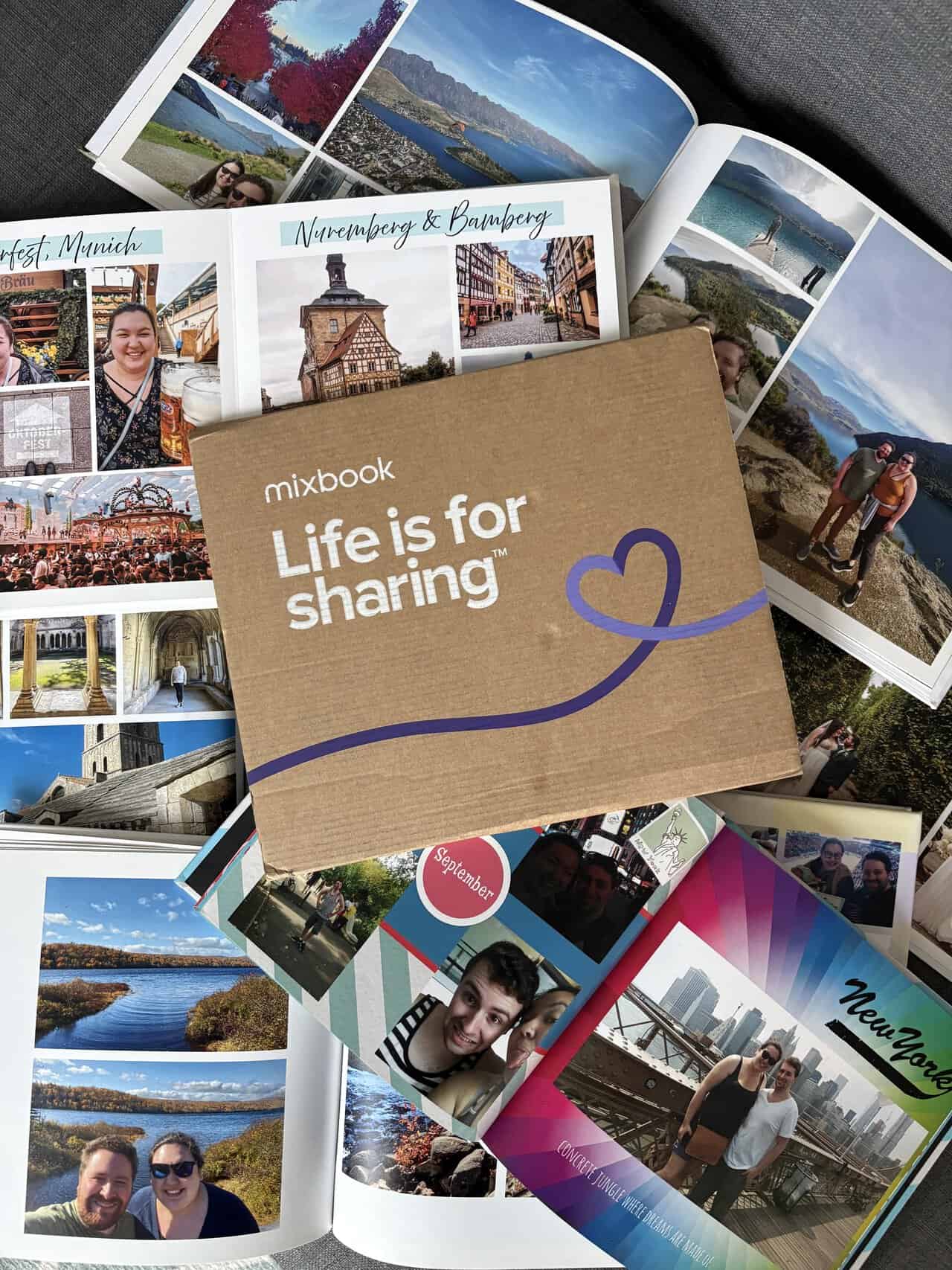

When I previously reviewed a few online photo book services, I found Mixbook’s online photo book creator, Mixbook Studio, to be the best of the bunch.
A few years later and Mixbook’s photo book editor is even better! Plus, they now offer Story Mode, if you’re short on time and want Mixbook to do the heavy lifting for you.
Not only is Mixbook Studio easy to use, but it’s also a lot of fun. They offer lots of different themes, stickers, backgrounds, fonts, text styles, etc.
The options are truly endless. They even have modern offerings, like AI generated captions and maps with geo-locations.

Mixbook Story Mode


I like that the Mixbook Studio allows you to fully unleash your creativity while still making things nice and simple. It’s so easy to tell your story!
If you don’t know where to start, you can pick from one of their many beautiful themes (and switch to a different theme easily if you ever change your mind). You can then have Mixbook auto-layout your photos on each page for you.
You can even design your entire book on your phone with the Mixbook app and Story Mode, if you don’t want to spend hours on your desktop.
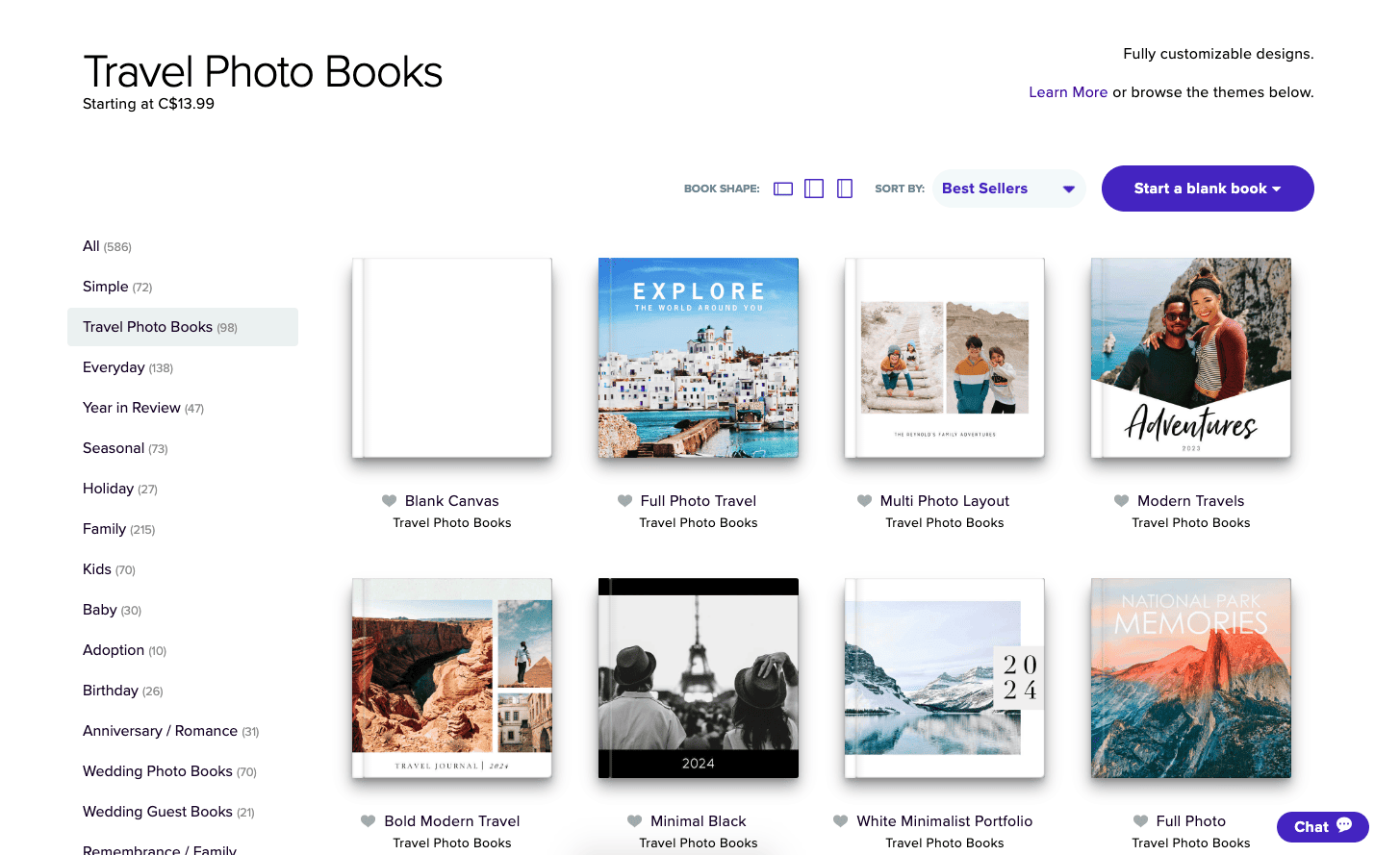
Or, if you like to have a bit more creative control like I do, you can start with a blank book. You can choose from different photo layouts for each page or even create your own.
When I created my baby photo book with Mixbook in Oct 2025, I went with one of their themes and tweaked it to add exactly the photos and text I wanted. Check out how I made my baby photo book here!
I did the same thing with my custom board book in Aug 2026, choosing the ABC theme and tweaking from there with my own photos and text.
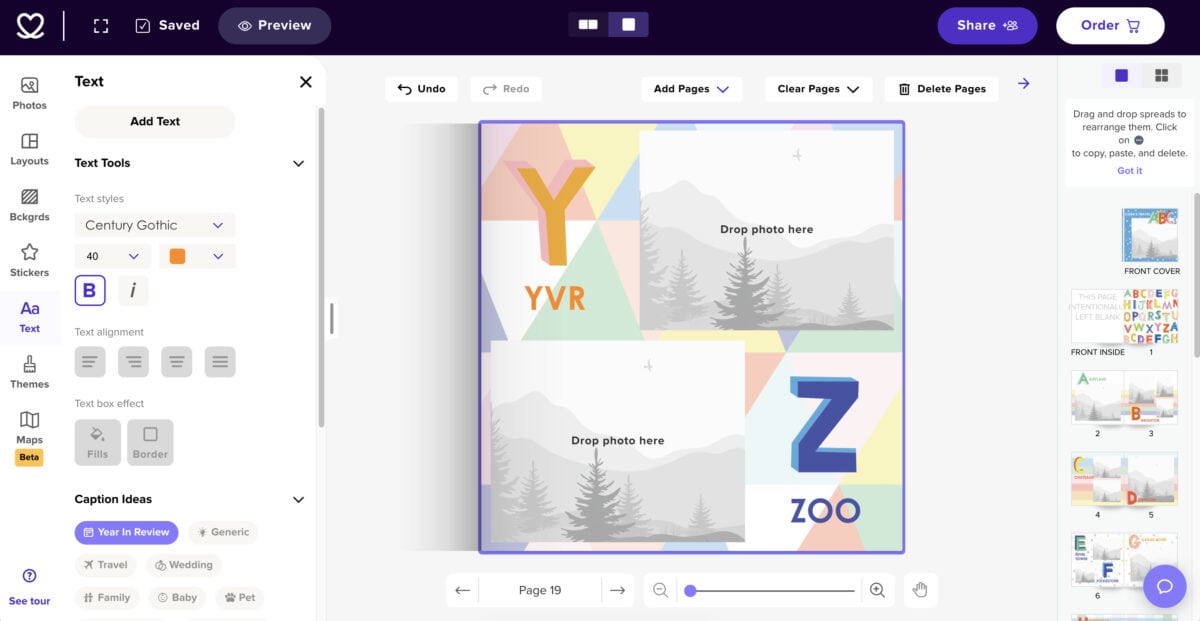
I really like how intuitive Mixbook Studio is, with photos and extra options on the left, and the pages on the righthand side. It was easy to collapse different options if I wanted to focus on my current page or view all of my pages together.
Mixbook Studio 2026

Mixbook Studio 2024
One minor issue I had was with the layouts for the photos. Despite there being so many layout options, I found the ones with a thin white border (my preference) were more limited.
Luckily, I could select layouts with larger borders or no borders and resize them myself, but I wish there was a way to put a consistent border on every page of the book, while still picking different photo layouts.
This isn’t just a problem with Mixbook – I haven’t seen any other photo book company do this any better – so maybe it’s just a request for future innovation!

Another thing I loved about making my Mixbook photo book was how easy it was to share the project.
Before ordering, I wanted to show my husband, Colin, what the book was looking like. While I’m usually the one who puts our photo books together, I like to get his input.
Rather than just calling him over, I was easily able to send him the photo book in progress through Mixbook Studio. I could even invite him to edit the book (though I didn’t, because I’m not giving up that creative control!).


Get up to 50% off!
Up to 50% Off Mixbook + Free Shipping* using code MIXTEA26
Expires October 31, 2026
*Up To 50% Off + Free Shipping On $59+ Or Free Canadian Standard Shipping (No Min) Or Free US Budget Shipping (No Min). See full terms below.
Here are the details of my final order with Mixbook:
For a grand total of $110.49 CAD ($82 USD) before shipping. I don’t know about you, but $100+ for a photo book is quite a lot to spend for me!
Luckily, that wasn’t the final price.
First, a few things: I did opt for some more premium options. I went with a hardcover photo book and medium sized album, which are more expensive.
I also added a ton of pages; the standard book comes with 20 pages and my book was 45. It’s just so hard to narrow down beautiful travel photos!

So you can definitely create a more affordable photo book with Mixbook.
As of October 2026, a 6×6″, softcover, 20 page photo book, only costs $13.99 CAD ($10 USD). Or you could go full luxury with a 12×12″, matte premium lustre, 20 page, lay flat photo book from $219.99 CAD ($155 USD).
You can check out all of the current options and pricing for Mixbook photo books here.
While Mixbook does have their prices available online, they’re not listed on the main photo books page or in Mixbook Studio.
Personally, I prefer the transparency of seeing the cost of my book as I’m creating it. Maybe I would’ve added fewer pages that way
 !
!
But here’s the great thing about online photo books: there’s always a discount!
In all my years of making photo books, I don’t think I’ve ever paid full price for one. There are always discounts and deals available, such as my coupon code below!
Speaking of: CLICK HERE to use code MIXTEA26 to get up to 50% off your Mixbook photo books plus free shipping*.
So that $110 CAD ($77 USD) book I designed? It ended up being only $55 CAD ($39 USD) after applying my discount code. I was also able to get free shipping, saving even more money!
When I created a 12×12″ Wall Square Photo Calendar at the end of last year, I was also able to take advantage of a discount code. My $42 CAD ($30 USD) calendar went down to just $19 CAD ($13 USD) before shipping!

At the end of the day, it all comes down to the product. What good is a discounted photo book with a fun building software if the book itself isn’t up to par?
Luckily, this is where Mixbook really shines. In my previous photo book review post, I shared that my Mixbook album was my favourite. The pages were thick, the cover was soft and the print quality was exceptional.
Well, they’ve done it again! And despite opting for less fancy finishes, my more recent Mixbook photo books all still look and feel incredible.
For starters, my Mixbook arrived much faster than expected. It was supposed to arrive on March 5th but I received it on February 29th. This has been my experience every single time I’ve ordered with Mixbook – delivery is always super fast!
I also had access to tracking the whole time, so I always knew where my book was. It was delivered right to my apartment door, rather than to the building or a pick-up centre, so I didn’t have to worry about it getting lost or damaged.
The packaging that Mixbook uses is secure, but not wasteful. It was one connected piece of cardboard that safely held my book in place so it wouldn’t get damaged.
There was no extra plastic, huge empty box or tons of paper with it. I really appreciated that!

2024 Mixbook packaging

2026 Mixbook packaging
Right away, I loved the look and feel of my Mixbook photo book.
The matte hard cover album feels really smooth and made to last. It’s definitely the nicest feel of all the photo books I have. Even their soft cover books have a smooth and professional feel to them!
As I opened the book, I could tell that it was different from my previous Mixbook where I had upgraded to lay flat, premium lustre pages. These pages didn’t lay perfectly flat, but I could still get the book to sit open when I bent the spine backwards.
The pages in this book were also thinner, but I don’t know if that’s a bad thing. The premium lustre pages in my other book are so thick that I often think I have two pages in my fingers instead of one!

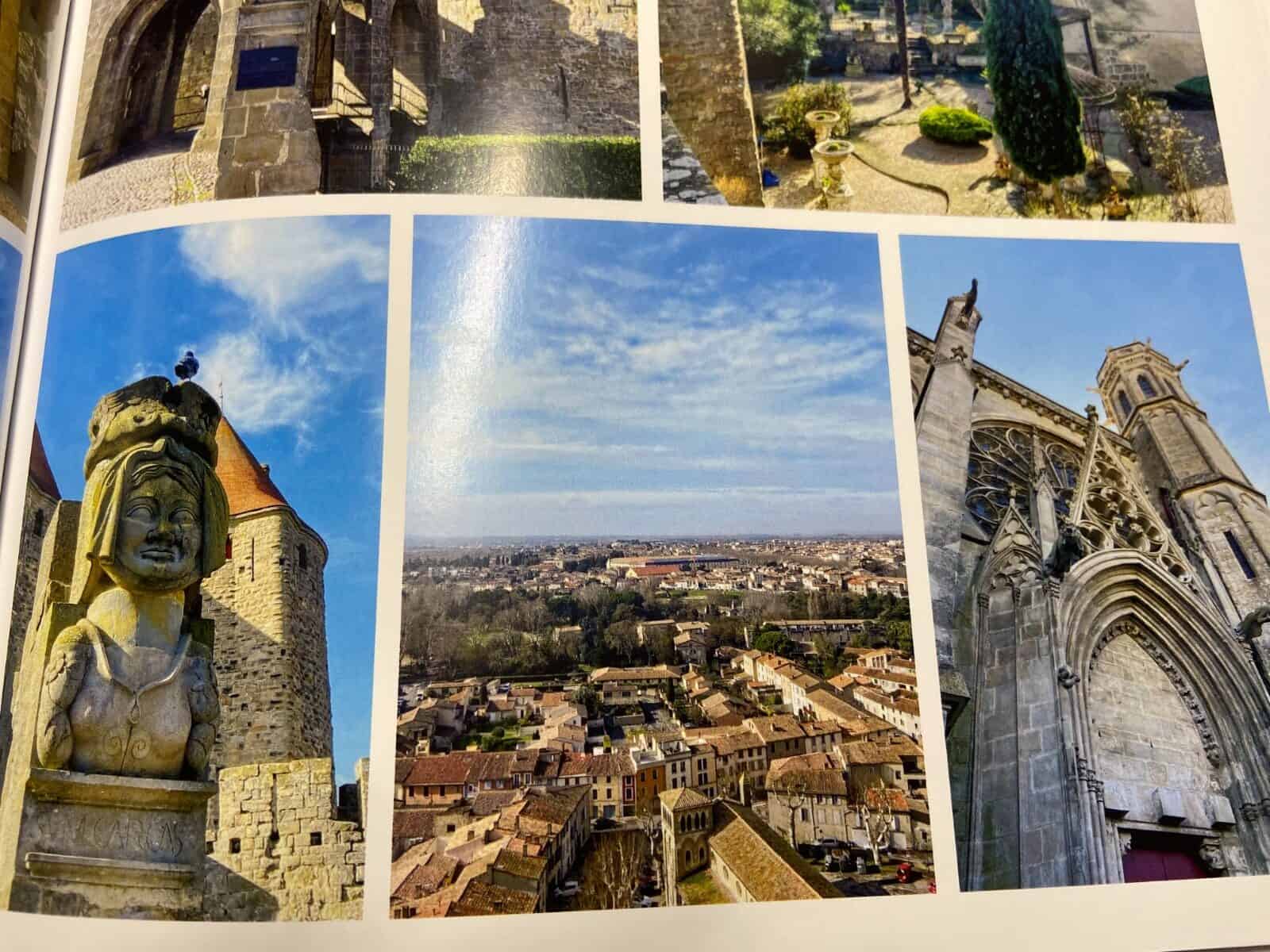
Overall, the printing looked really good. The images were crisp and clean. And all of the colours looked rich and vibrant.
I noticed one or two images that were slightly lower quality but honestly, that was my fault, as I had accidentally compressed all of my images before adding them to the Mixbook Studio.
Mixbook will flag when a photo is low quality but they didn’t do this for my book because the photos I added were not low quality enough to get flagged. I think you’d only notice they were slightly lower quality if you really squinted hard.
My biggest issue with the photo book is a glaring error on my part.
In my jet lagged stupor (I was so excited to make this book that I got to work on it the day we got home from France), I accidentally put the city name Arles on two pages. The second one was supposed to be Nimes. Whoops!


Besides the extra Arles text, I was super excited to show this book to Colin when he got home. He loved looking through it, snickering at some funny photos and pointing out favourite memories.
Colin remarked again about how great it is that we have these books to look back on so many of our adventures. And now that our daughter is flipping through them too, I’m even more glad we have them made.
When I asked what he thought of the book, Colin had this eloquent statement to share:
“That is one good book.” – My husband
I mean, he’s not wrong!

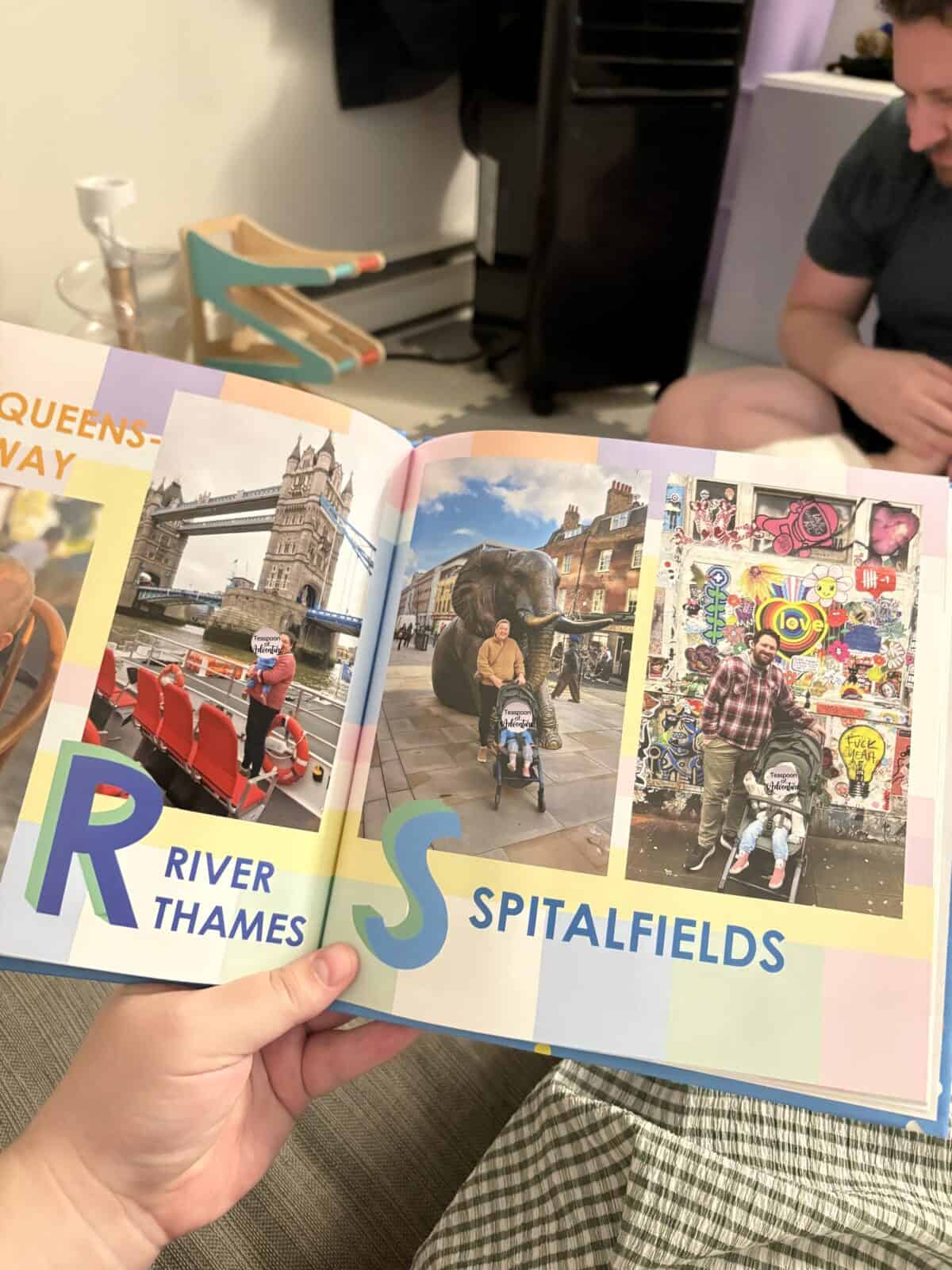

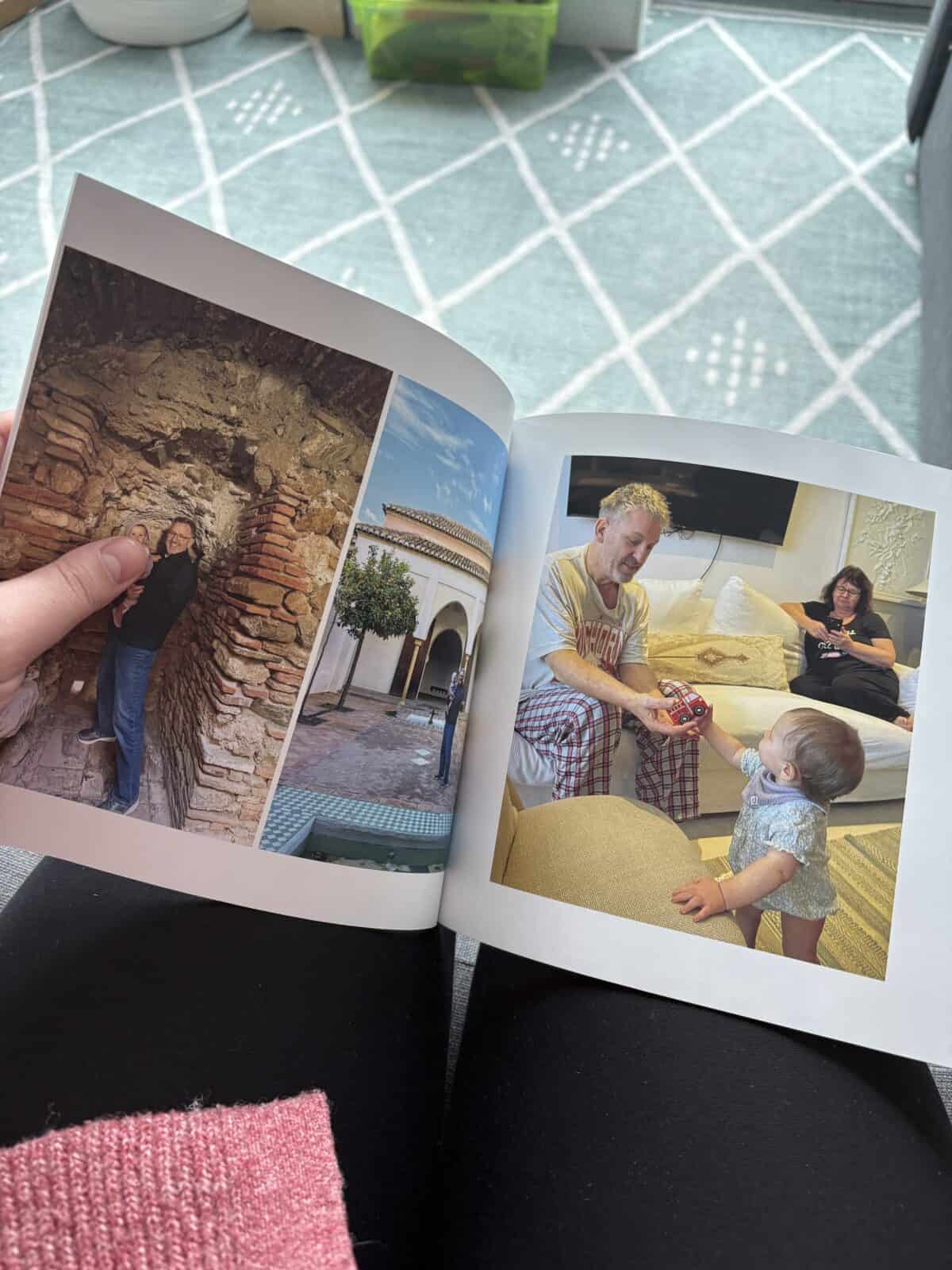
Since creating my South of France book in 2024, Mixbook has gone on to impress me with the quality of their photo books (both soft and hardcover) and their calendars.
The quality is incredible and they’re super durable too, especially considering ours are being flipped through by a toddler all the time!
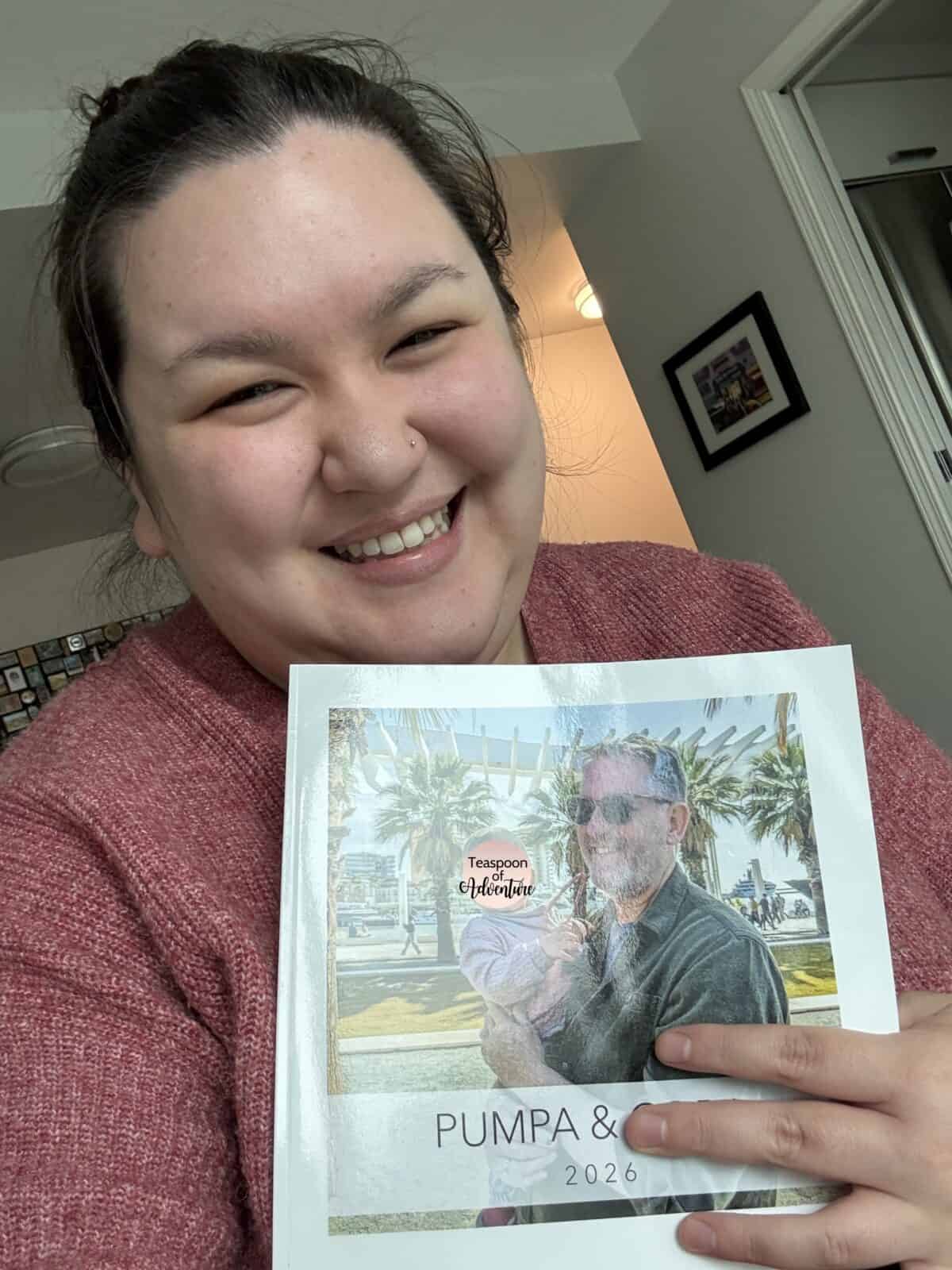

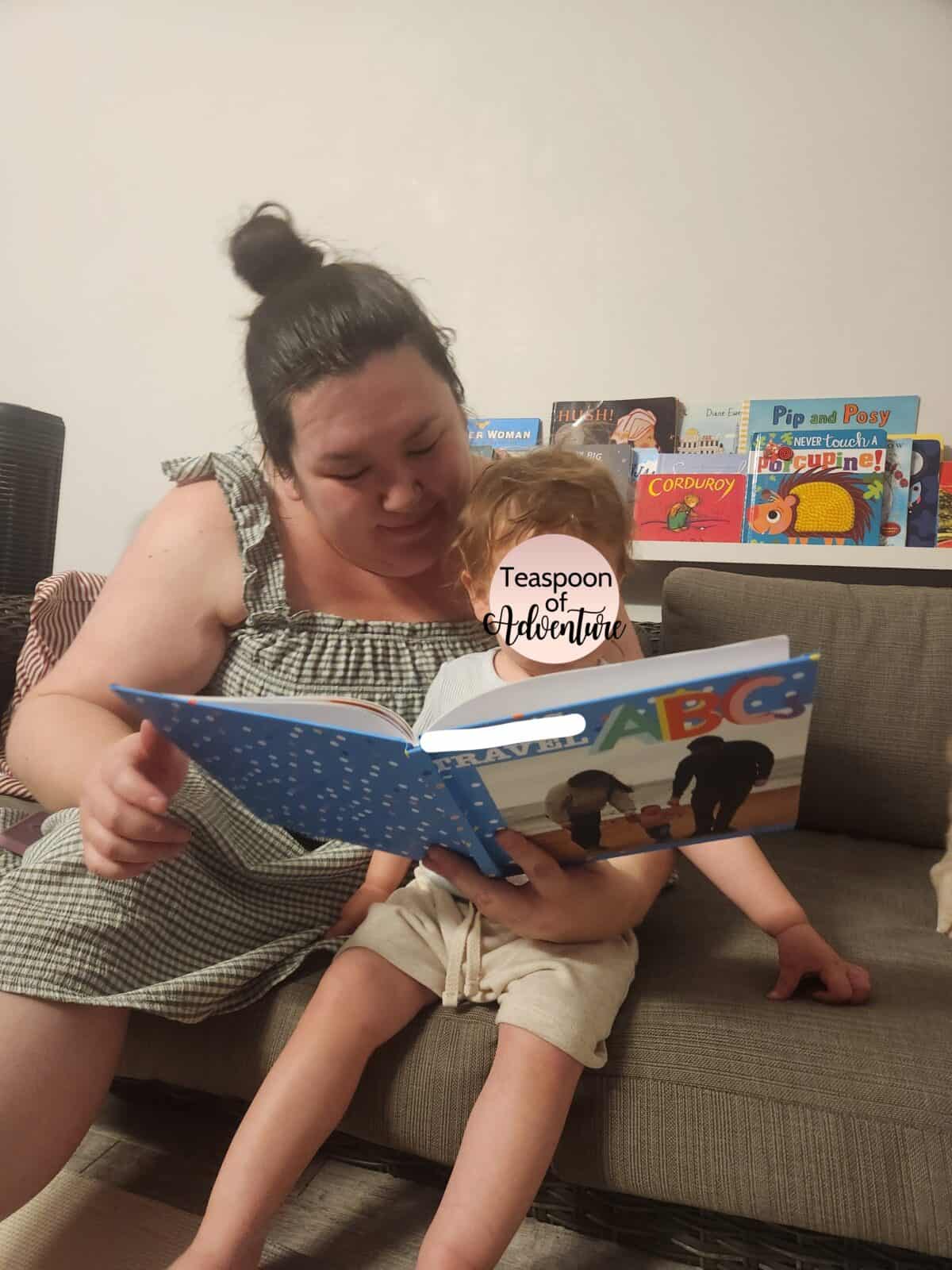
Overall, I’m really happy with our books and would highly recommend Mixbook photo books if you’re looking for a quality photo book, fast delivery and a fun, easy to use editing studio.
Mixbook isn’t the cheapest option available, but I think they’re worth the slight splurge for the quality of photo book they deliver. Plus, with my discount code, the final price is a lot better
Having ordered dozens of products from Mixbook over the years, I definitely know I can count on them. They’re my preferred option for capturing our memories and make incredible gifts for loved ones.
I’m so glad I chose Mixbook for our year abroad in Prague photo book, as that’s definitely a year I want to remember. And I’m happy that I turned to Mixbook again to create our baby photo book, as I know that’s a book we’ll cherish for our daughter’s whole life.
While a 40+ page, lay flat photo book isn’t always in my budget, I like that Mixbook offers less expensive options too, like a soft cover or smaller photo books. And their other products, like their calendars, are also fun and affordable.
And, lucky for you, Mixbook photo books just got even more affordable when you use my 50% off discount code, MIXTEA26.
Get up to 50% off!
Up to 50% Off Mixbook + Free Shipping* using code MIXTEA26
Expires October 31, 2026
*Up To 50% Off + Free Shipping On $59+ Or Free Canadian Standard Shipping (No Min) Or Free US Budget Shipping (No Min). See full terms below.
Full Terms: Up To 50% Off + Free Shipping On $59+ Or Free CA. Standard Shipping (No Minimum) Or Free US. Budget Shipping (No Minimum): This offer is only valid with coupon code MIXTEA26. Enjoy 25-50% off almost everything. This offer is not valid for 6×6 photo books and softcover photo books.
Free CA Standard Shipping applies only to orders totaling $59+ after discount is applied, and shipping to the continental Canada. Free US Standard Shipping applies only to orders totaling $59+ after discount is applied, and shipping to the continental United States.
This offer cannot be combined with other coupons, vouchers, Groupons, or applied after an order has been placed. Discount applies only to completed projects. No adjustments on previous purchases. Taxes will apply. Offer expires October 31, 2026.
The post My Mixbook Photo Books Review (+ 50% off code!) appeared first on Teaspoon of Adventure.
After spending 10 days in the South of France, I wanted to memorialize the trip with a photo book. For this one, I partnered with Mixbook, an online photo service company that I’ve used in the past and really enjoyed.
I first used Mixbook in 2022 to make my biggest photo book project ever – a 51 page lay-flat book documenting our year abroad in Prague. I was so impressed with the quality and still love flipping through that book many years later.
I used Mixbook again in May 2025, trying out their soft cover photo book, in Sep 2025, creating my own baby book, and in Dec 2025, creating custom wall calendars.
I used Mixbook twice in 2026, creating an ABC board book for my daughter (such a hit!) and using Story Mode to quickly create a book for my dad’s birthday. He loved it!
Of all the photo books I’ve made and of all the different online services I’ve tried, Mixbook has always stood out for their quality, ease of use and fast delivery times.
Below I’m sharing my experience using Mixbook, what the process was like putting together my photo book and what the end product looked like.
I’ll also share tips for creating your own Mixbook photo books, plus a 50% off coupon for Mixbook with code MIXTEA26!
Get up to 50% off!
Up to 50% Off Mixbook + Free Shipping* using code MIXTEA26
Expires October 31, 2026
*Up To 50% Off + Free Shipping On $59+ Or Free Canadian Standard Shipping (No Min) Or Free US Budget Shipping (No Min). See full terms below.
Disclosure: This post is sponsored by Mixbook; all opinions are my own. Some of the links below are affiliate links, meaning if you click through and make a purchase, I will earn a small commission at no additional cost to you. Thanks to you (& Mixbook) for your support!
Why make a photo book?
So why make a photo book in the first place? After all, printed photo albums are dated and we carry our photos on our phones with us all the time, right?
There’s definitely something old school about having a printed photo book. But to me, that’s part of the magic!
No one wants to stare at your tiny phone screen to see your latest travel photos. And even fewer people want to watch a slideshow on your laptop or TV.
But a photo book? People love going through them!
As the proud owner of over a dozen photo books, I can confidently say that each one has been poured over by friends and family. My daughter loves going through our photo books and pointing out all of the people she knows.
Photo books are the best way to share memories – especially important ones, like a wedding or baby’s first year. I’m so glad I have those moments off my screen and in my hands.
They also make amazing gifts! One of my go-to gifts after a trip is making a photo book for everyone I travelled with. I also make books for special occasions, like this one I made for my dad’s birthday!
I’ve gifted these to my parents, siblings and in-laws, and they always make the best souvenir from our time away together.
More than just gifts for others, I believe photo books are a lot of fun for yourself too. Every time I do go through my photo books, I’m instantly transported back to some of my favourite places around the world!
I now get to share these memories with my daughter, who loves to flip through the books too. She loves it so much that I made her a custom board book with her own travel photos!
The process: Making my Mixbook photo book
When I previously reviewed a few online photo book services, I found Mixbook’s online photo book creator, Mixbook Studio, to be the best of the bunch.
A few years later and Mixbook’s photo book editor is even better! Plus, they now offer Story Mode, if you’re short on time and want Mixbook to do the heavy lifting for you.
Not only is Mixbook Studio easy to use, but it’s also a lot of fun. They offer lots of different themes, stickers, backgrounds, fonts, text styles, etc.
The options are truly endless. They even have modern offerings, like AI generated captions and maps with geo-locations.
Mixbook Story Mode
I like that the Mixbook Studio allows you to fully unleash your creativity while still making things nice and simple. It’s so easy to tell your story!
If you don’t know where to start, you can pick from one of their many beautiful themes (and switch to a different theme easily if you ever change your mind). You can then have Mixbook auto-layout your photos on each page for you.
You can even design your entire book on your phone with the Mixbook app and Story Mode, if you don’t want to spend hours on your desktop.
Or, if you like to have a bit more creative control like I do, you can start with a blank book. You can choose from different photo layouts for each page or even create your own.
When I created my baby photo book with Mixbook in Oct 2025, I went with one of their themes and tweaked it to add exactly the photos and text I wanted. Check out how I made my baby photo book here!
I did the same thing with my custom board book in Aug 2026, choosing the ABC theme and tweaking from there with my own photos and text.
I really like how intuitive Mixbook Studio is, with photos and extra options on the left, and the pages on the righthand side. It was easy to collapse different options if I wanted to focus on my current page or view all of my pages together.
Mixbook Studio 2026
Mixbook Studio 2024
One minor issue I had was with the layouts for the photos. Despite there being so many layout options, I found the ones with a thin white border (my preference) were more limited.
Luckily, I could select layouts with larger borders or no borders and resize them myself, but I wish there was a way to put a consistent border on every page of the book, while still picking different photo layouts.
This isn’t just a problem with Mixbook – I haven’t seen any other photo book company do this any better – so maybe it’s just a request for future innovation!
Another thing I loved about making my Mixbook photo book was how easy it was to share the project.
Before ordering, I wanted to show my husband, Colin, what the book was looking like. While I’m usually the one who puts our photo books together, I like to get his input.
Rather than just calling him over, I was easily able to send him the photo book in progress through Mixbook Studio. I could even invite him to edit the book (though I didn’t, because I’m not giving up that creative control!).
Get up to 50% off!
Up to 50% Off Mixbook + Free Shipping* using code MIXTEA26
Expires October 31, 2026
*Up To 50% Off + Free Shipping On $59+ Or Free Canadian Standard Shipping (No Min) Or Free US Budget Shipping (No Min). See full terms below.
The price: How much do Mixbook photo books cost?
Here are the details of my final order with Mixbook:
- 8.5″ x 8.5″
- Classic Square Matte
- Hardcover Photo Book
- 45 pages
For a grand total of $110.49 CAD ($82 USD) before shipping. I don’t know about you, but $100+ for a photo book is quite a lot to spend for me!
Luckily, that wasn’t the final price.
First, a few things: I did opt for some more premium options. I went with a hardcover photo book and medium sized album, which are more expensive.
I also added a ton of pages; the standard book comes with 20 pages and my book was 45. It’s just so hard to narrow down beautiful travel photos!
So you can definitely create a more affordable photo book with Mixbook.
As of October 2026, a 6×6″, softcover, 20 page photo book, only costs $13.99 CAD ($10 USD). Or you could go full luxury with a 12×12″, matte premium lustre, 20 page, lay flat photo book from $219.99 CAD ($155 USD).
You can check out all of the current options and pricing for Mixbook photo books here.
While Mixbook does have their prices available online, they’re not listed on the main photo books page or in Mixbook Studio.
Personally, I prefer the transparency of seeing the cost of my book as I’m creating it. Maybe I would’ve added fewer pages that way
But here’s the great thing about online photo books: there’s always a discount!
In all my years of making photo books, I don’t think I’ve ever paid full price for one. There are always discounts and deals available, such as my coupon code below!
Speaking of: CLICK HERE to use code MIXTEA26 to get up to 50% off your Mixbook photo books plus free shipping*.
So that $110 CAD ($77 USD) book I designed? It ended up being only $55 CAD ($39 USD) after applying my discount code. I was also able to get free shipping, saving even more money!
When I created a 12×12″ Wall Square Photo Calendar at the end of last year, I was also able to take advantage of a discount code. My $42 CAD ($30 USD) calendar went down to just $19 CAD ($13 USD) before shipping!
The product: Reviewing my photo book
At the end of the day, it all comes down to the product. What good is a discounted photo book with a fun building software if the book itself isn’t up to par?
Luckily, this is where Mixbook really shines. In my previous photo book review post, I shared that my Mixbook album was my favourite. The pages were thick, the cover was soft and the print quality was exceptional.
Well, they’ve done it again! And despite opting for less fancy finishes, my more recent Mixbook photo books all still look and feel incredible.
For starters, my Mixbook arrived much faster than expected. It was supposed to arrive on March 5th but I received it on February 29th. This has been my experience every single time I’ve ordered with Mixbook – delivery is always super fast!
I also had access to tracking the whole time, so I always knew where my book was. It was delivered right to my apartment door, rather than to the building or a pick-up centre, so I didn’t have to worry about it getting lost or damaged.
The packaging that Mixbook uses is secure, but not wasteful. It was one connected piece of cardboard that safely held my book in place so it wouldn’t get damaged.
There was no extra plastic, huge empty box or tons of paper with it. I really appreciated that!
2024 Mixbook packaging
2026 Mixbook packaging
Right away, I loved the look and feel of my Mixbook photo book.
The matte hard cover album feels really smooth and made to last. It’s definitely the nicest feel of all the photo books I have. Even their soft cover books have a smooth and professional feel to them!
As I opened the book, I could tell that it was different from my previous Mixbook where I had upgraded to lay flat, premium lustre pages. These pages didn’t lay perfectly flat, but I could still get the book to sit open when I bent the spine backwards.
The pages in this book were also thinner, but I don’t know if that’s a bad thing. The premium lustre pages in my other book are so thick that I often think I have two pages in my fingers instead of one!
Overall, the printing looked really good. The images were crisp and clean. And all of the colours looked rich and vibrant.
I noticed one or two images that were slightly lower quality but honestly, that was my fault, as I had accidentally compressed all of my images before adding them to the Mixbook Studio.
Mixbook will flag when a photo is low quality but they didn’t do this for my book because the photos I added were not low quality enough to get flagged. I think you’d only notice they were slightly lower quality if you really squinted hard.
My biggest issue with the photo book is a glaring error on my part.
In my jet lagged stupor (I was so excited to make this book that I got to work on it the day we got home from France), I accidentally put the city name Arles on two pages. The second one was supposed to be Nimes. Whoops!
Besides the extra Arles text, I was super excited to show this book to Colin when he got home. He loved looking through it, snickering at some funny photos and pointing out favourite memories.
Colin remarked again about how great it is that we have these books to look back on so many of our adventures. And now that our daughter is flipping through them too, I’m even more glad we have them made.
When I asked what he thought of the book, Colin had this eloquent statement to share:
“That is one good book.” – My husband
I mean, he’s not wrong!
Since creating my South of France book in 2024, Mixbook has gone on to impress me with the quality of their photo books (both soft and hardcover) and their calendars.
The quality is incredible and they’re super durable too, especially considering ours are being flipped through by a toddler all the time!
Final thoughts: Are Mixbook photo books right for you?
Overall, I’m really happy with our books and would highly recommend Mixbook photo books if you’re looking for a quality photo book, fast delivery and a fun, easy to use editing studio.
Mixbook isn’t the cheapest option available, but I think they’re worth the slight splurge for the quality of photo book they deliver. Plus, with my discount code, the final price is a lot better
Having ordered dozens of products from Mixbook over the years, I definitely know I can count on them. They’re my preferred option for capturing our memories and make incredible gifts for loved ones.
I’m so glad I chose Mixbook for our year abroad in Prague photo book, as that’s definitely a year I want to remember. And I’m happy that I turned to Mixbook again to create our baby photo book, as I know that’s a book we’ll cherish for our daughter’s whole life.
While a 40+ page, lay flat photo book isn’t always in my budget, I like that Mixbook offers less expensive options too, like a soft cover or smaller photo books. And their other products, like their calendars, are also fun and affordable.
Use my Mixbook coupon for 50% off!
And, lucky for you, Mixbook photo books just got even more affordable when you use my 50% off discount code, MIXTEA26.
Get up to 50% off!
Up to 50% Off Mixbook + Free Shipping* using code MIXTEA26
Expires October 31, 2026
*Up To 50% Off + Free Shipping On $59+ Or Free Canadian Standard Shipping (No Min) Or Free US Budget Shipping (No Min). See full terms below.
Full Terms: Up To 50% Off + Free Shipping On $59+ Or Free CA. Standard Shipping (No Minimum) Or Free US. Budget Shipping (No Minimum): This offer is only valid with coupon code MIXTEA26. Enjoy 25-50% off almost everything. This offer is not valid for 6×6 photo books and softcover photo books.
Free CA Standard Shipping applies only to orders totaling $59+ after discount is applied, and shipping to the continental Canada. Free US Standard Shipping applies only to orders totaling $59+ after discount is applied, and shipping to the continental United States.
This offer cannot be combined with other coupons, vouchers, Groupons, or applied after an order has been placed. Discount applies only to completed projects. No adjustments on previous purchases. Taxes will apply. Offer expires October 31, 2026.
The post My Mixbook Photo Books Review (+ 50% off code!) appeared first on Teaspoon of Adventure.